
How to leverage AI in your spreadsheets.
Hey there! This week we're targeting a much requested breakdown: how to clean up a messy spreadsheet with AI.
Use whatever messy spreadsheet is already in front of you: an inventory list, budget, data-heavy sheet, copied table, CSV, schedule, or expense export. First we will help you pick the right AI tool and set it up, then show you how to have AI inspect the full sheet, propose a cleanup plan, make approved changes, and verify the result.
Before we get into it, here's this week at a glance.
- 01Clean up a messy spreadsheet with AI. Whether you use Excel or Google Sheets, we will show you how to set up the right tool, ask AI to inspect the full spreadsheet, approve the cleanup plan, and verify the changes.Playbook
- 02U.S. government forces Anthropic to ban latest AI models. On June 12, Anthropic was forced to withdraw its latest AI models because of national security concerns.Regulation
- 03Also this week: AI infrastructure keeps moving. SpaceX's IPO and exercised option to acquire Cursor (popular AI coding application) are worth watching because cheaper infrastructure and stronger coding agents can eventually mean better, cheaper AI tools for regular people.Other News
How to clean up a messy spreadsheet with AI.
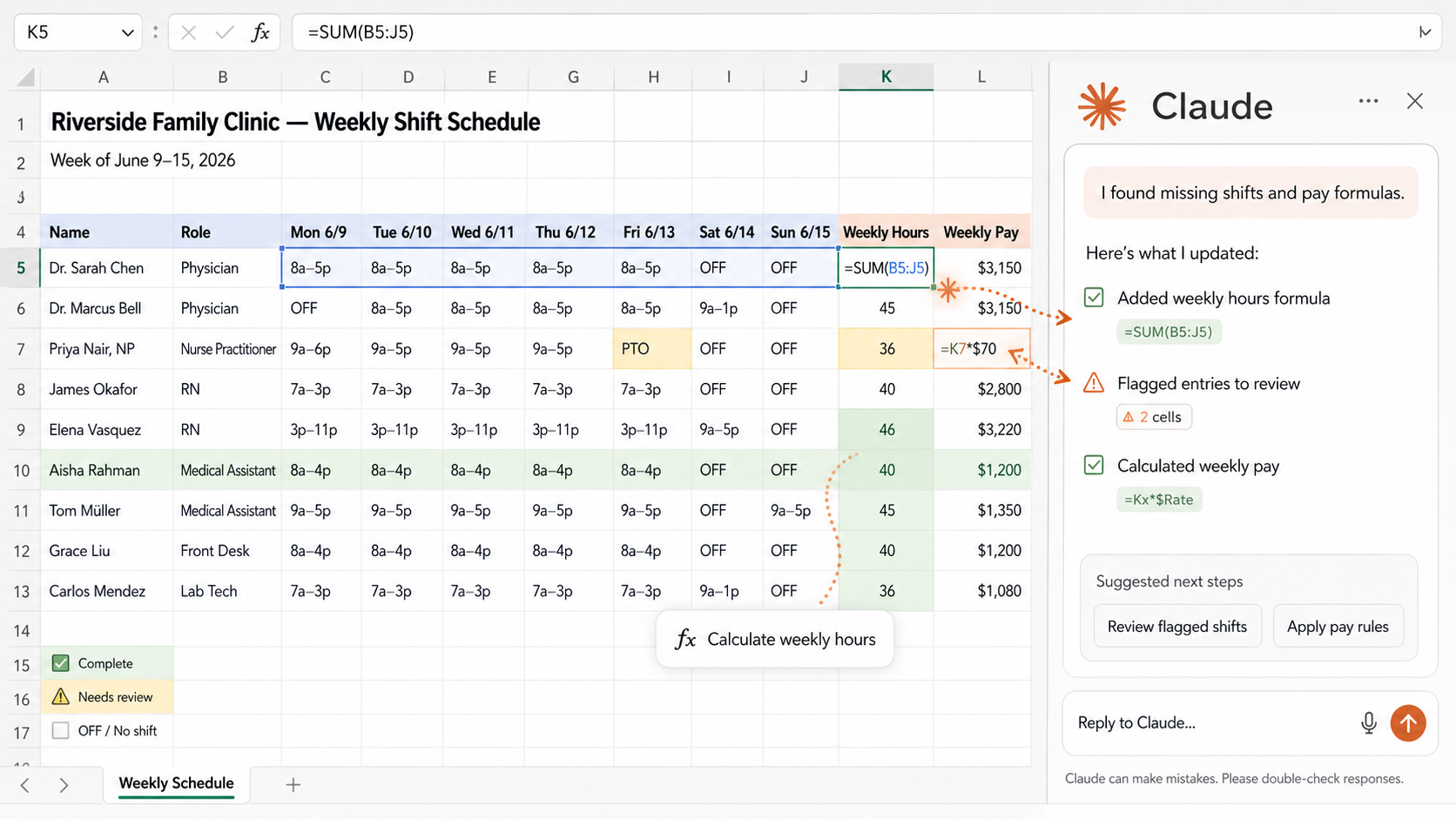
Most people use AI for spreadsheets the hard way. They ask a chatbot what formula to write, copy it into Excel or Google Sheets, hit an error, then go back and ask what went wrong.
The better move is to bring AI into the spreadsheet itself so it can read the cells, formulas, tabs, and formatting directly. This week, the workflow is simple: inspect the full sheet, get the cleanup plan, approve it, then verify what changed.
We've used similar workflows to organize 2025 tax data, parse hundreds of lines of business expenses and income, and build a profit-and-loss summary to review with an accountant. The useful part was not that AI magically did everything. The useful part was that it helped organize the mess, then gave us a clear checklist of everything that it did.
Step 1: Set up the right tool
- Excel: Start with Claude for Excel. Individual users can start from the Claude for Microsoft 365 listing. Claude for Excel requires a Pro, Max, Team, or Enterprise plan. Some users may need IT to approve the add-in first, but it is worth it.
- Backup: If you already have ChatGPT or prefer ChatGPT, use ChatGPT for Excel instead. It supports ChatGPT Free, Go, Plus, Pro, and organization plans, although access can vary.
- Google Sheets: Use ChatGPT for Google Sheets from Google Workspace Marketplace. After installing it, open a Sheet and go to Extensions > ChatGPT > Open.
- If you already have Copilot or Gemini, you can test Edit with Copilot in Excel or Gemini in Google Sheets, but we prefer Claude for Excel and ChatGPT for Sheets. They work better for this workflow and have fewer hiccups.
Step 2: Open a messy spreadsheet and ask AI to inspect the whole thing first.
Paste this into the AI sidebar: Review this spreadsheet. Take in every tab, column, formula, and table you can access. Tell me what it contains, what looks messy, and what cleanup plan you recommend. Do not change anything yet. Wait for my approval.
Step 3: Approve the plan or ask for changes.
If the plan matches what you want, approve it and let AI begin. If the plan misses something, ask it to revise the plan first. The plan is what makes verification easier because you know what it intended to change.
Step 4: Verify.
Once the changes have been made, review row counts, totals, formulas, sample rows, and anything AI marked uncertain. If you want more cleanup, summarizing, formatting, or formula help, repeat the same inspect-plan-approve-verify loop.
Other useful things to ask AI inside a spreadsheet.
Help me understand what this spreadsheet is tracking and where my expertise is needed.Design a better version of this spreadsheet from scratch. Ask me questions first, then suggest tabs, columns, formulas, and summary views.Color-code this sheet so I can quickly see missing data, risky rows, completed items, and categories.Turn this messy data into a clean tracker I can keep using every week.Create a summary view that shows the most important numbers, what changed, and anything unusual.
The U.S. government ordered Anthropic to ban access to its latest AI models.
happened
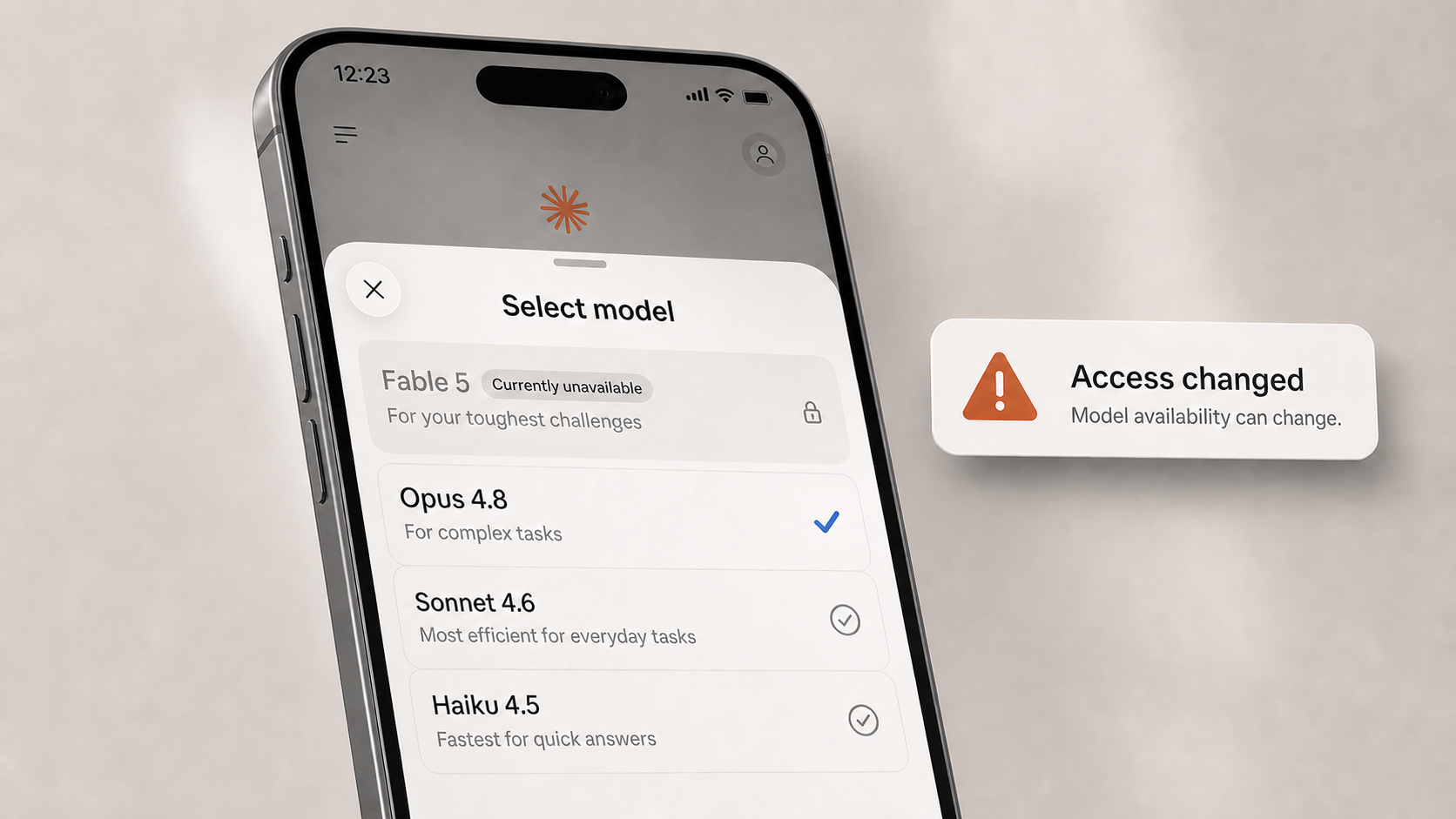
U.S. export controls forced Anthropic to pull or restrict access to Fable 5 and Mythos 5 (their latest AI models). Fable 5 is the same model we covered last week. These models are especially strong in cybersecurity.
for you
Your access to AI models (like Claude) is not guaranteed. It can be taken away. Whether you are an individual or a company, ensure that you understand how to use other AI models and can switch. Do not be entirely dependent on one AI company.
- Know how to use both Claude and ChatGPT.
- Save your useful prompts so you can reuse them in another model.
- For companies, be able to swap out your AI models quickly, without taking a major performance hit.
The best AI users are tool-flexible. They know which model they prefer, but they are not stuck if that model is unavailable.
- •SpaceX's IPO: an AI infrastructure story. If SpaceX helps make launches, satellites, energy, and compute infrastructure cheaper, that can eventually mean better and cheaper AI tools for everyone. We recommend watching this.
- •SpaceX exercised its option to acquire Cursor for $60B. This is worth watching even if you do not code. This is a massive acquisition. It means better coding agents could make websites, apps, automations, and internal tools easier to build from plain instructions.
- •OpenAI plans to acquire Ona to improve long-running agent work. The AI agents you use will slowly start moving from quick chat replies toward long-running jobs (potentially spanning multiple days), while remembering everything.
See you next week,

Ky Tomita, The Playbooks AI