
How to automate your post-meeting follow-ups.
Hey there! By the end of this issue you will have a workflow you can run after any meeting so you never lose an action item: AI debriefs the conversation, you verify it against what was actually said, and the approved tasks land in your to-do list. You stay present in the meeting, and the follow-ups still get done. Automating this is one of my favorite ways to hand busywork to AI, and this is exactly how I do it.
The timing is not an accident. Anthropic just released its most capable Claude model yet, and it changes how much you can hand an AI in one ask. We will start with the new model and what it changes, then walk the playbook and show how you can apply it this week. Other news stories at the bottom, including a new Siri.
- 01Anthropic released its most capable Claude yet. AI is still improving fast. This model excels at solving hard problems, and needs less hand-holding.Model
- 02The command I run after every meeting. This week's playbook: AI debriefs your meeting, you verify the action items, and the approved tasks land in your to-do list. Steps at the end of this issue.Playbook
- 03Also: a new Siri, AI IPOs, and an OpenAI superapp. Apple previews a smarter Siri, Anthropic and OpenAI both filed to go public, and OpenAI is folding Codex into the ChatGPT app.News
Anthropic's new Claude model changes what you should ask AI for.

happened
Anthropic released a new Claude model on June 9: Claude Fable 5, its most capable model yet. It is a new tier above Opus, the top model until last week.
Here is why it matters even if you never touch this specific model. Many people assumed AI models were starting to level off. This release shows they are still improving, by a lot.
for you
Anthropic's guidance for Fable 5 reads differently than past launches. You can give it a short, plain instruction instead of a long list of rules. Prompts written for older models can be too prescriptive and make results worse. Their advice: bring it a harder problem than you would have given an AI before.
Early testers ran with that, and the asks were not typical:
- One writer fed it a grainy, muddy lecture recording from 2007 and got back a custom listening app with cleaned-up audio and a transcript synced to playback. (Dan Shipper, Every)
- The same writer gave it hundreds of subscriber survey responses plus the site's analytics. It found their biggest conversion issue and proposed an experiment nobody on the team had suggested. (Every)
- One tester handed it a 50-page document of interconnected documents and asked it to check the plan against the actual project. It flagged what was done, partly done, and missing. (Hacker News)
- Anthropic's own demos include finishing a Pokémon game from screenshots and building a solar system simulation, from physics first principles, that predicts solar eclipses.
The practical move: ask for something you normally would not ask for, then verify it.
- Describe the result you want, not the steps, like
turn this meeting into my to-do list. Let the model plan the work. - Ask for uncertainty: have it mark assumptions, missing context, and places it inferred too much.
- Review before action. A more capable model should not become an unsupervised one. Early reports show guardrails occasionally misfiring on normal asks, and heavy use gets expensive, so keep an eye on your usage.
Now, should you pay for it? Here is the quick math:
- Claude's plans: Free, Pro at $20 a month, and Max at $100 to $200 a month for heavy use.
- Fable 5 is included on Pro, Max, Team, and seat-based Enterprise plans at no extra cost through June 22. On June 23 it comes off those plans, and using it will take usage credits you buy separately. The next two weeks are your window to try it.
- My rule of thumb: save the smartest model for your hardest problems, like multi-step projects and big messy documents. For quick questions and simple drafts, a default model is faster and cheaper. The same logic applies to ChatGPT and Gemini.
How I automate my post-meeting follow-ups.
playbook
Meeting notes are not new; AI has helped people summarize meetings for a while. The catch is that a recorder's job ends at the transcript. The useful part is what you do with it next. We'll take a look at how to automate this step.
First you need a transcript. No recorder yet? Your video call's own recording or a free notetaker like Fathom covers online meetings. Your phone can also be used to record in-person meetings: iPhone Voice Memos and Notes can transcribe for free. The playbook has the full list.
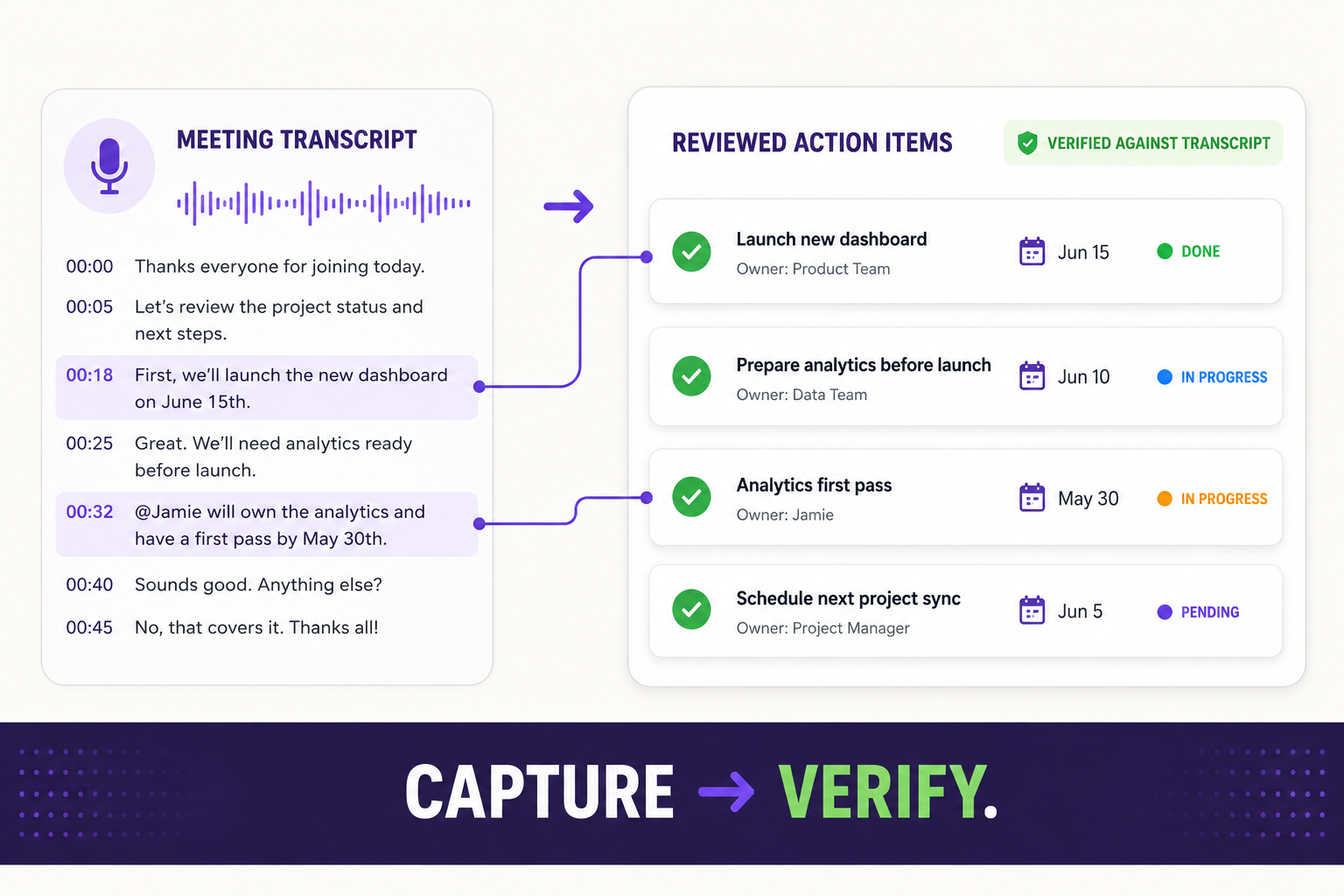
After all my meetings, I run a saved command called /process-meeting. This is a reusable instruction I trigger by name instead of retyping it every time. It finds the meeting, pulls the transcript, extracts the notetaker's action items, scans for the additional commitments people implied but did not spell out, and shows me a finalized list before it creates anything.
Once I approve that list, it automatically adds the items I kept to my to-do list, each with a task name, owner, priority, and supporting details.
You do not need my exact setup to copy the pattern. The simple version works in any chatbot: paste the transcript, have it pull and verify the action items, then drop the approved list into your tool. To go hands-free, Claude can connect to your notetaker to pull the meeting and to your task app, like Notion or Todoist, to push the list. The key is always the same: extract, then verify.
then route
Here is the part most people skip: the review. A meeting recorder will happily invent a task nobody actually agreed to, so before anything becomes real work, I check the list myself.
- Pull the facts: decisions, commitments, owners, deadlines, risks, and anything left unclear.
- Separate real action items from notes, ideas, and homework that belongs to someone else.
Once the list checks out, get it out of the recorder. A task trapped in your meeting app is a task that dies there:
- Route it out: send the approved tasks to the one place you actually check, like Notion, Apple Reminders, or your team's tracker, not the recorder they came from.
- Send it: have AI draft the recap for attendees and a short note to each owner about what they committed to, ready for your review before anything goes out.
- Chase it: at the end of the week, hand the list back and ask what is still open, then have it draft the nudges. The follow-up on the follow-ups is the part no recorder does for you.
The payoff: you stay present in the conversation instead of scribbling notes, and the tracking still gets done.
The full step-by-step version lives in our library, with the exact /process-meeting command, the connectors that let Claude pull and push for you, and the guard rails that keep it safe to repeat. Read the full playbook.
Your move this week: pick a call with a transcript or the messiest meeting from last week, and run the steps below. Route only the items you approve into your list. The whole pass takes about 15 minutes. Once you get comfortable with the setup, you can start to automate more of it.
Workflows like this free up your time from manual admin tasks so you can spend more time on the work that truly matters.
Run it on your last meeting
- 1.Get the meeting to Claude: paste the transcript into the chat, or connect your notetaker (Otter, Granola, Fathom, and others) and ask Claude to pull it up.
- 2.Paste this prompt to process it:
From the meeting I give you, pull every action item, including the ones people only implied. Use the transcript as the source of truth, not the summary. Show me a table first with the task, owner, due date, a short quote from the transcript, and anything you are unsure about, and create nothing yet. Once I approve, add the approved tasks to my to-do list, or format them for me to paste, each linked back to the meeting, and draft a recap I can send. - 3.When it shows you the table, tell Claude about any changes: drop an item you do not want tracked, fix an owner or a date, or have it clarify anything that looks off.
- 4.Approve, and let it write the tasks to your tool, or paste the list it formats for you. The full
/process-meetingcommand is in the playbook.
- •A new Siri is coming later this year. Personal context, actions across your apps, and a Camera mode. Better than today's Siri, even if it is not everything we hoped for. Beta later this year, English first.
- •Anthropic and OpenAI both filed to go public. Within a week of each other, both announced confidential S-1 filings, the private first step toward an IPO (Anthropic June 1, OpenAI June 8). No price or date set yet.
- •OpenAI is folding Codex into the ChatGPT app. OpenAI says Codex lands in the ChatGPT app in the next few weeks. The Financial Times reports it is part of a bigger redesign that combines ChatGPT, Codex, agents, and partner apps in one place.
See you next week,

Ky Tomita, The Playbooks AI