
Starting from the beginning.
This week, I want to take a step back.
The world of AI moves incredibly fast. A new model is released. A new feature ships. A new tool promises to change the world. But for most people, the bigger problem is simpler: they do not even know what AI really is, what AI tools exist, and more importantly which ones to use.
So this week we will cover the latest AI stories that actually matter. Second, we will build a simple map: what AI is, what tools exist, and how to start using them without getting lost.
Ultimately, you should know what tools exist, but you do not need to memorize every name, feature, or workflow. Those will keep changing. The skill that lasts is learning how to work with AI: understand the task you are working on, choose the right tool, give it useful context, ask the right questions, and review what comes back.
- 01Codex is becoming a knowledge-worker app. Codex is OpenAI's coding agent, but OpenAI is moving it beyond code and into reports, dashboards, workflows, and other real business outputs.OpenAI
- 02Claude Opus 4.8 shows the model gap is narrowing. Anthropic released Claude Opus 4.8. They also released dynamic workflows, which can dispatch many agents against one job.Claude
- 03AI Basics: AI 101. We are taking a step back to discuss: what AI is, what tools exist, and how to choose one for writing, research, building, design, and repeatable work.AI Basics
Codex is becoming a knowledge-worker app, not just a coding tool.
happened
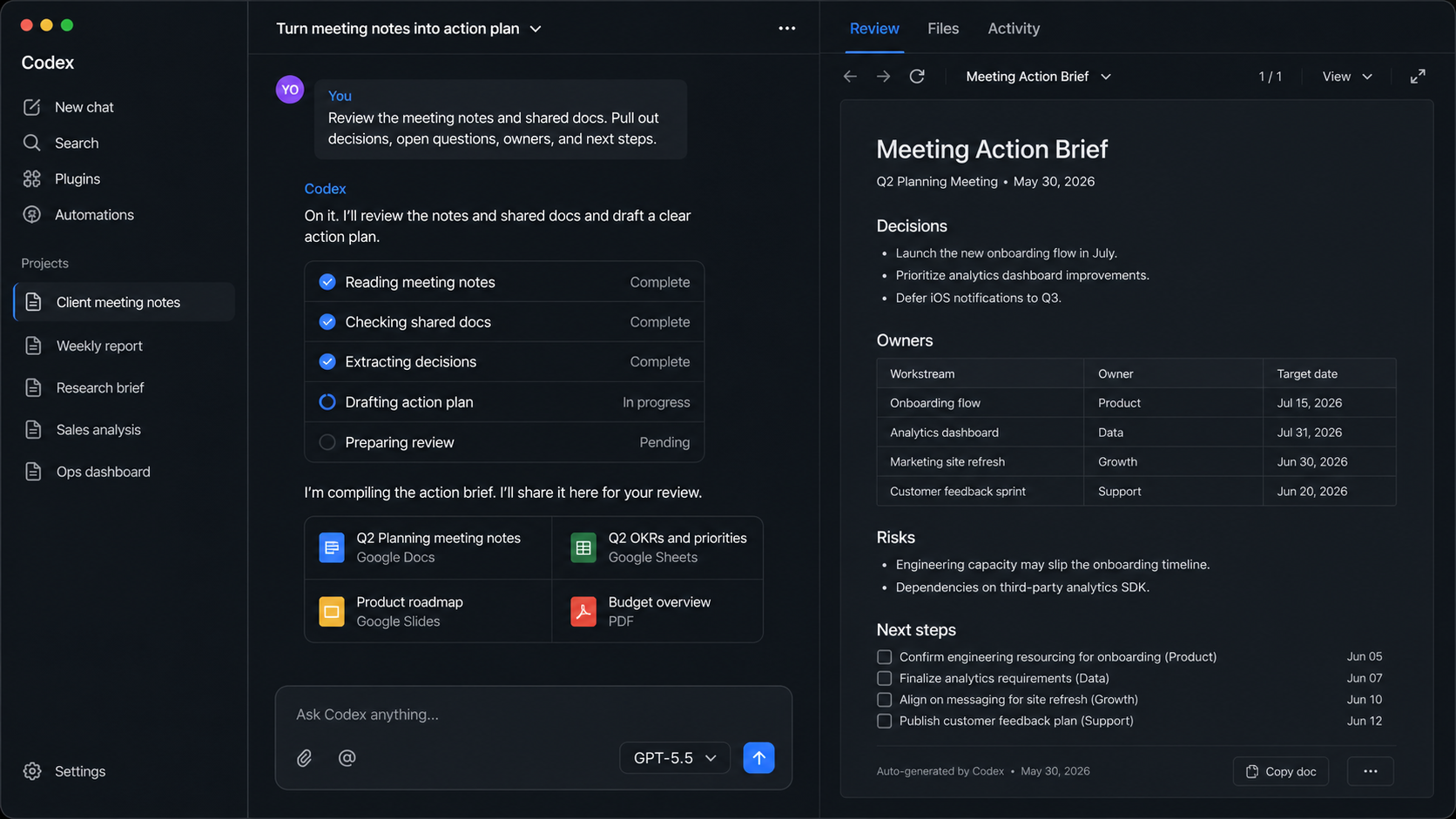
Codex is OpenAI's coding agent. Simply put, it is a workspace where AI can inspect files, use tools, make changes, and show its work.
- Developers use it to read codebases, develop code, test their applications, review changes, and see what changed.
- OpenAI says knowledge workers are using it for reports, spreadsheets, presentations, contracts, research, data analysis, workflow automations, and lightweight tools.
- OpenAI says Codex has more than 5 million weekly active users, with knowledge workers now about 20 percent of users and growing faster than developers.
The shift: Codex is moving from AI for coding toward AI for any work.
for you
This is why I think Codex is worth learning even if you are not a developer.
- Use ChatGPT or Claude when you want to think, write, ask questions, or shape an idea.
- Use a tool like Codex when you want AI to inspect files, use tools, make changes, or help finish a real work artifact.
- Of course if you work at a company, use approved accounts and do not paste sensitive work data into random AI tools. But this should be a tool that you encourage your company to test.
There is a shift from AI can draft text to AI can help complete real work while you review the output. In the near future, being proficient with tools like this will become as commonplace as being proficient with a spreadsheet.
Claude Opus 4.8 narrows the gap, but dynamic workflows are the real story.

happened
Anthropic released Claude Opus 4.8 on May 28. It is the newest version of Claude's strongest model, with improvements across coding, agentic work, reasoning, and practical knowledge work.
- The model is strong enough to keep narrowing the gap between Claude and ChatGPT.
- Anthropic also released dynamic workflows in Claude Code.
- Dynamic workflows let Claude plan a large job, split it into smaller tasks, run hundreds of parallel subagents in one session, verify the outputs, and report back.
In plain English: one prompt can turn into many AI agents working on different parts of the job at the same time.
for you
The bigger pattern is model convergence. Claude and ChatGPT still have different strengths, and we still prefer GPT-5.5 overall, but the gap is narrowing.
- Use dynamic workflows when the job has many pieces to check: code, research, audits, migrations, cleanup, or competitive analysis.
- Be careful: a pattern we keep seeing is that more agents means more cost and more output to review.
- Activity is not the same as progress. An AI tool can think longer and write more, but still miss what you actually needed.
- The fix is clarity: when you use these tools define the job you need it to do (clearly), name what output you want, ask for evidence, and review the result.
My simple takeaway: when using AI tools, start small and be intentional. Think through what you are asking the tool to do, because more is not always better.
AI 101: what AI is, what tools exist, and when to use them.
is
In today's terms, AI is software built around large models running on powerful computers. Those models are trained on huge collections of text, images, code, audio, and other data, so they can recognize patterns, follow instructions, and generate useful outputs.
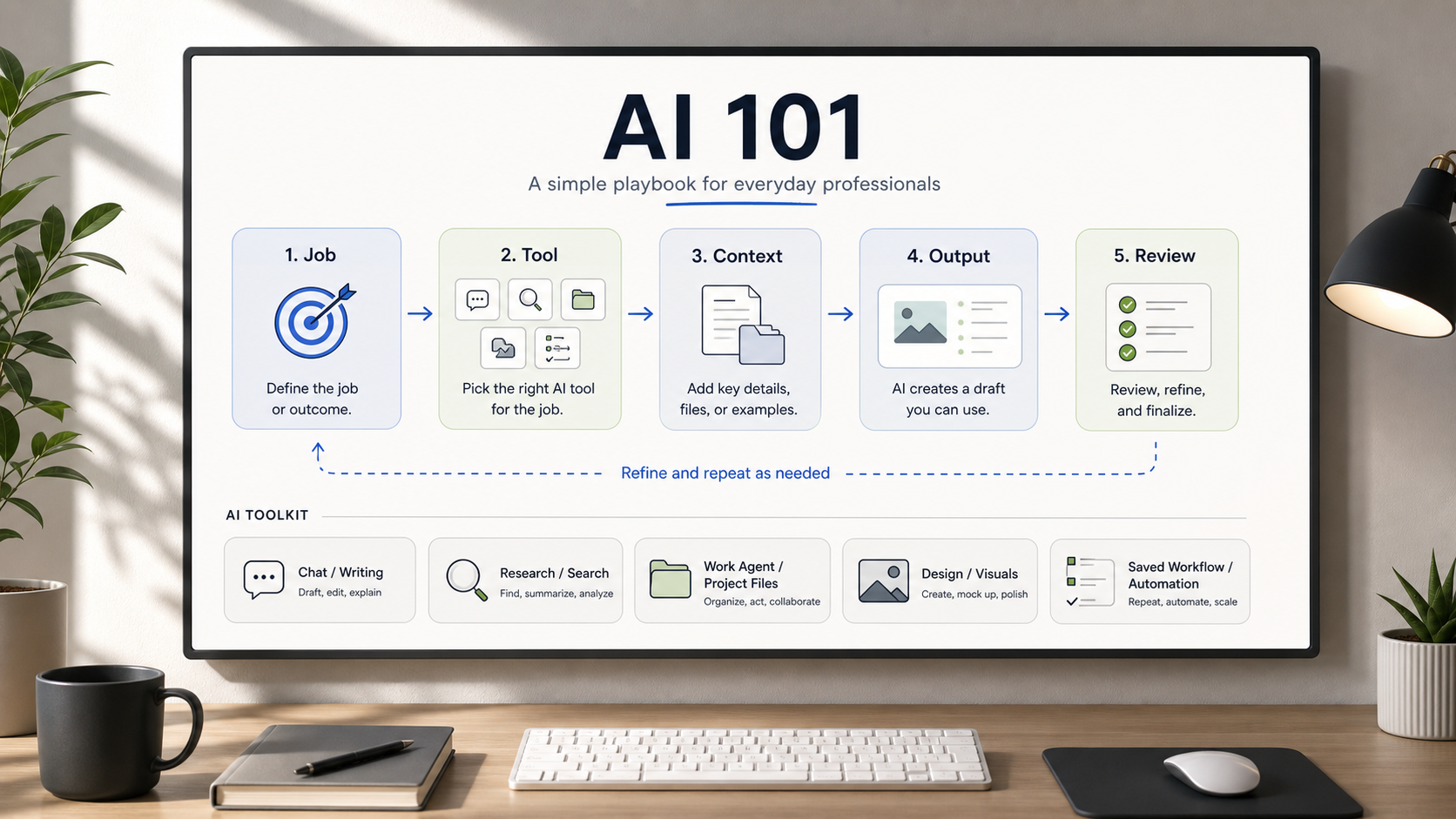
It is not magic, and it is not automatically correct. Think of it like this: you give AI inputs, it gives you an output, and you review the result. Here are the basic pieces that make that work:
- Model: the engine underneath. GPT and Claude are examples.
- App: the place you use it. ChatGPT, Claude, Codex, Perplexity, and Google AI Mode are examples.
- Prompt: the instruction you give the AI.
- Context: the goal, notes, files, examples, constraints, and definition of a good result.
- Tools and connectors: ways AI can reach another system, like Search, Gmail, Drive, Notion, calendars, files, a browser, or a repo.
- Agent or Skill: a way to make AI do multi-step or repeatable work with saved instructions.
The practical formula: clear goal + useful context + right tools + human review = better AI work.
use it
Most people start with ChatGPT, and that is fine. The real value is learning when another AI tool is a better fit for the job. These are not the only tools that exist, but they are a few of the popular ones worth knowing:
- Google Search with AI Mode: our first stop for quick answers, everyday search, and current information.
- Perplexity: source-backed research when you want cleaner citations and a research-style answer.
- ChatGPT: a strong general default for questions, writing, file analysis, images, voice, and quick help.
- Claude: writing, editing, long documents, careful critique, and thoughtful back-and-forth work.
- Claude Design: posters, slide decks, brochures, website prototypes, visual concepts, and other design work.
- Claude Code: coding and project work when you want Claude to inspect and change a codebase.
- Codex: heavier work with coding, research, bookkeeping cleanup, meeting processing, action items, email workflows, automations, files, and projects.
The products will keep changing. The durable skill is learning how to describe the work clearly, choose a reasonable starting tool, give good context, and review the result.
Practice choosing the right tool.
- 1.Pick one real problem you are dealing with this week.
- 2.Write the outcome first:
I am trying to...Be specific about what you want at the end. - 3.Name the type of work: answer, research, write, design, organize, automate, build, or decide.
- 4.Choose the tool yourself from the AI Basics map above. Quick answer: Google AI Mode. Sources: Perplexity. Writing: ChatGPT or Claude. Visual: Claude Design. Code: Claude Code or Codex. Files, meetings, admin, or automation: Codex.
- 5.Load the context it needs: attached files, Google Drive docs, meeting notes, emails, calendars, spreadsheets, links, examples, background, audience, and constraints.
- 6.Ask for the output you actually want: answer, source list, draft, deck outline, poster concept, action-item table, automation plan, or code change.
- 7.Example prompt:
I am trying to [specific outcome]. Use [attached files, Drive docs, notes, links, or examples] as context. Create [output format] for [audience]. Follow [constraints]. If anything is missing or uncertain, say so.
See you next week,

Ky Tomita, The Playbooks AI