
Agents are moving from coding to chores
Hey there, thanks for subscribing. The Playbooks AI is here to help people turn AI into practical leverage: at work, in business, in school, in creative projects, and in everyday life.
I started this because I believe AI can help create a new generation of builders. Not just people who read about new tools, but people who know how to use them to solve real problems, save time, learn faster, and create things they could not have created before.
Each week, I'll break down the AI stories that matter, explain what they mean for you, and give you a practical playbook you can try yourself.
This week, the most useful story is simple: agents are getting better at everyday work. They can help with email inbox cleanup, finding and unsubscribing from subscriptions, chatting with customer support, day-long tasks, and the planning work around all of it.
That matters because most people do not need another chatbot. They need an assistant they can dispatch and trust. Someone to do the boring work, check the links, click through the messy pages, draft the reply, provide evidence, and stop before doing anything risky.
So the playbook this week is simple: if your ChatGPT plan gives you Codex, try it on one real chore. There are other AI tools like Claude that you can leverage as well, but we've found Codex from OpenAI to be the best as of now. To begin, start with easy integrations like your inbox. It is low-risk, easy to review, and almost everyone has subscriptions they meant to clean up months ago.
- 01Codex is not just for coding. OpenAI's use-case page now points people toward inbox work, computer control, longer goals, data cleanup, and other everyday workflows.Try
- 02Goal mode lets the agent keep going. A `/goal` run can keep working for hours/days against a clear finish line, which makes agents feel less like chat and more like autonomous help.Test
- 03Start with an inbox chore. Use Codex with Gmail, Outlook, or a browser to find unneeded subscriptions, make a review list, and help unsubscribe.Playbook
- 04Image generation is becoming a work tool. The useful move is not making random art. It is editing real visuals, making diagrams, and turning complicated tasks into something easier to follow.Try
- 05SpaceX is becoming AI infrastructure. Anthropic and Cursor are both pointing at SpaceX-scale compute. For users, that can mean higher limits, faster agents, better models, and maybe cheaper access over time.Insight
The Codex use-case page is worth browsing like a menu.
happened
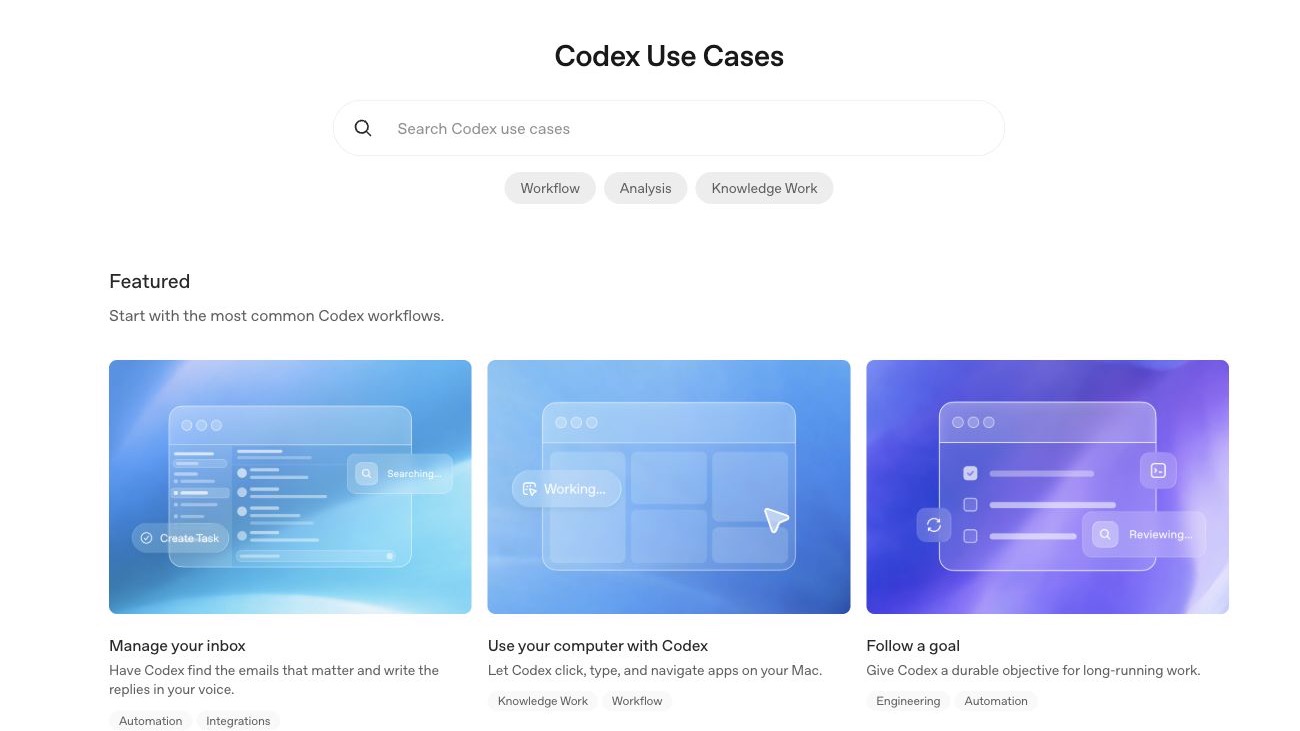
OpenAI's Codex use-case page has turned into a practical catalog for getting more out of the app. Codex is OpenAI's AI agent for getting work done. Think of it as a more action-oriented version of ChatGPT: you give it a job, it can use tools like files, a browser, connected apps, or computer control, and it works with you to complete real tasks.
Codex started as a coding agent for writing, reviewing, and shipping software, but this page shows how quickly it is moving beyond coding. It has workflows for managing your inbox, using your computer, following a goal, generating slide decks, building or deploying an app, preparing meeting briefs, learning a new topic, and turning messy work into something organized. Instead of opening Codex and wondering what to ask, you can pick one of those examples and use it as a starting point.
for you
If you are non-technical, think of Codex as a supervised assistant for the work you usually avoid: inbox cleanup, document organization, meeting notes, research summaries, simple slide decks, and click-by-click browser tasks. You still approve sensitive actions, but it can do the sorting, drafting, checking, and organizing for you.
If you are technical, it is still useful because the page gives you patterns for bigger work: build an app from a rough idea, turn designs into UI, review a pull request, QA an app with computer use, update documentation, or save repeatable work as a skill.
The bigger takeaway is that Codex is becoming more than a coding application. It is starting to look like an everything app for supervised work. The use-case page is basically a public playbook library for learning what to delegate in Codex, how to describe the job, what to ask for, and where the agent should stop for approval.
The best part is that if you already pay for ChatGPT, this may not be another tool you need to buy. OpenAI says Codex is included with Plus, Pro, Business, and Enterprise/Edu plans, with usage limits depending on the plan.
Codex Goal mode lets the agent keep working.

happened
OpenAI's Goal mode use case describes `/goal` as a way to give Codex one durable objective and a verifiable stopping point. Instead of one prompt and one response, you give the agent a job, the context it needs, and a way to prove whether the job is actually done.
I tested the shape of this with a blunt target: make me $20 net. Across roughly a day of attempts, it tried digital products, Reddit sales replies, bug bounty paths, and a few rough experiments. It kept working, checking, and moving to the next attempt, but it ultimately did not make the $20.
for you
That miss was the useful lesson. The hard part was not getting Codex to keep going. The hard part was giving it a strong enough goal. Make $20 net as fast as possible was too open. If I ran it again, I would narrow the products and tell it how to test distribution.
That is the shift to pay attention to. AI is becoming less like ask a question, get an answer and more like work toward this outcome, use these tools, log your work, validate the result, and stop when this condition is met.
For you, this means the prompt matters more than ever. A good goal gives Codex clear boundaries, the files or apps it can use, what it should avoid, how it should prove progress, and when it needs approval. These models and the apps around them are capable enough now that the next skill is learning how to assign the work well.
Let Codex clean up the subscriptions in your inbox.

happened
OpenAI's Codex use-case library now includes an inbox workflow. The official example focuses on finding important emails and drafting replies, but the same pattern works for a more universal chore: finding subscriptions and helping you unsubscribe from the ones you do not need.
The reason this is a good first agent task is that the output is easy to check. You can ask Codex to scan your Gmail, Outlook, or browser inbox, produce a list, sort each item into keep, unsubscribe, or unsure, and wait for your approval before it clicks anything.
for you
This is the kind of task that makes Codex useful even if you are not technical. From our testing, the Google Chrome extension inside Codex has been the easiest path for browser work because it is flexible and fast to steer. Codex can also drive your computer, including other browsers like Safari, when you grant that access.
The permissions matter. You choose which apps Codex can use, you can revoke access, and you should still approve sensitive actions yourself. That is the useful middle ground: it can handle the busy work that no longer makes sense to do by hand, while you stay in control of what it is allowed to touch.
The bigger takeaway is how capable these agents have become. When you give Codex/similar AI agents clear instructions, the right connections, and proper permissions, it can handle tedious work like searching, sorting, opening pages, checking links, and reporting back while you supervise as much as you want.
Start using this pattern on more low-risk work, both personally and professionally. The win is not just a cleaner inbox. It is freeing yourself from manual chores that drain time and attention, while still keeping a human in charge of the important decisions.
Clean up subscriptions with Codex
- 1.Open Codex if your ChatGPT plan includes it.
- 2.Choose the setup. We would start with GPT-5.5, Fast Mode, and the highest reasoning level available to you.
- 3.Connect Codex to the right source: Gmail or Outlook if you are comfortable, the Codex Chrome extension if you want to work through your browser, or computer use if Codex needs access to a specific app. Grant only the access needed for this task.
- 4.Give Codex this job:
Go through my email and identify recurring subscriptions, newsletters, paid services, receipts, and repeat senders. Give me the sender, category, rough value, recommendation, and your proposed action plan. Do not unsubscribe from anything until I approve the plan. - 5.Review the plan yourself. Tell Codex what to keep, what to ignore, what not to touch, and what needs more caution. Be extra careful with paid, work, school, financial, legal, medical, or account-security-related items.
- 6.Let Codex execute only after you approve. Start with a small batch, or approve the full plan if you are comfortable. Ask for a final report with what changed, what it skipped, what failed, and what still needs manual review.
Image generation is becoming a practical work tool.

happened
OpenAI's image generation docs now treat image creation and image editing as first-class workflows. The current models can generate from a prompt, edit from input images, and support different quality and size choices depending on the job.
The real unlock is not making fun images. It is using images as part of the work. We used Codex to clean up a roadmap graphic that had a few bad text artifacts and small shape issues. The goal was not to redesign the whole thing. It was to keep the image consistent, fix the specific rough spots, and produce a polished version with very few corrections. In the same app that we cleaned up our inbox, we also can generate images of anything, that's the power of Codex.
In another test, Codex helped with a DIY bedroom fan install. It researched the fan, compared parts, helped build the Amazon cart, and then produced clearer diagrams for how the fan, filler panel, weatherstripping, tape, locks, and airflow should fit together. The image work made the project easier to understand, not just prettier.
for you
That is the way most people should think about image generation. Use it to fix a visual you already have, turn research into a diagram, make a checklist easier to follow, or show someone how a physical setup should work.
The practical move is to give it a specific visual job: keep this design the same but clean up these three details, turn this product setup into a simple install diagram, or make this process easier for a non-expert to follow. Then review the output for text, labels, measurements, brand fit, and safety-critical details before you trust it.
For founders and operators, this cuts the time between idea and useful visual. You still need taste and review. But you no longer need to choose between a blank canvas, a rough screenshot, or a long explanation that nobody wants to read.
SpaceX is becoming part of the AI supply chain.

happened
Anthropic announced a compute partnership with SpaceX on May 6, saying the deal gives it access to all of the compute capacity at SpaceX's Colossus 1 data center. Anthropic tied that capacity directly to higher Claude Code and Claude API limits.
Cursor is pointing in the same direction from the coding-tool side. In its Composer 2.5 post, Cursor said Composer is better at sustained long-running work, and it also said Cursor is training a much larger model with SpaceXAI using 10x more total compute.
The broader signal is that SpaceX is not just a rocket company in this story. Colossus is compute capacity, Starlink is connectivity, and Starship is the long-term bet on moving more hardware into orbit. Anthropic even said it is interested in partnering with SpaceX on orbital AI compute capacity. That does not mean space data centers are around the corner, but it does show how big the AI infrastructure race is getting.
for you
The simple version: better AI is becoming an infrastructure problem. The model still matters, but so do power, chips, data centers, networks, and the ability to bring more capacity online faster than everyone else.
For regular users, this is bullish because more capacity usually shows up in practical ways first: higher usage limits, fewer interruptions, faster agents, longer background runs, and models that can do more work before they hit a wall. Anthropic already made that connection explicit by tying the SpaceX deal to higher Claude limits.
Over time, more compute can also create room for better and potentially cheaper models. That is why these infrastructure stories are worth watching even if you never touch a GPU. They are part of the reason the tools keep getting more capable, more available, and easier to use for real work.
See you next week,

Ky Tomita, The Playbooks AI